
Quick start#
import { useState } from "react";
import { Calendar, createCalendarConfig } from "@dateforge/react-calendar";
import { CalendarDays } from "@dateforge/react-calendar/modules";
import {
  CalendarToolbar,
  CalendarToolbarPrev,
  CalendarToolbarMonthTrigger,
  CalendarToolbarNext,
  CalendarToolbarYearTrigger,
} from "@dateforge/react-calendar/modules/toolbar";

// Compiled once at module scope — unit "day", mode "single" by default.
const config = createCalendarConfig();

export function DatePicker() {
  const [date, setDate] = useState<Date | null>(null);

  return (
    <Calendar
      config={config}
      value={date}
      onChange={(value) => setDate(value as Date | null)}
    >
      <CalendarToolbar>
        <CalendarToolbarPrev />
        <CalendarToolbarMonthTrigger />
        <CalendarToolbarNext />
        <CalendarToolbarYearTrigger compact />
      </CalendarToolbar>
      <CalendarDays />
    </Calendar>
  );
}
No global CSS import is required with ESM (any bundler, Next.js, Vite): every module ships its own styles and the bundler picks them up. CJS consumers import the shared stylesheet once — require("@dateforge/react-calendar/style.css") or the equivalent bundler import. In RSC frameworks, render the calendar behind a "use client" boundary.
Since 3.2.3 the package also ships the full reference offline: node_modules/@dateforge/react-calendar/DOCUMENTATION.md, plus an llms.txt summary for AI coding assistants — point your editor's agent at it and it gets the v3 API instead of guessing from older versions.
Core idea#
DateForge is a stateful composition wrapper with self-contained modules. Behavior is compiled once with createCalendarConfig({ mode, unit, locale, min, max, disabled, … }) and passed to the <Calendar> shell as a single config prop. The shell owns the value, view date, theme, appearance, scheme, and onChange wiring. It renders no picker UI by itself.
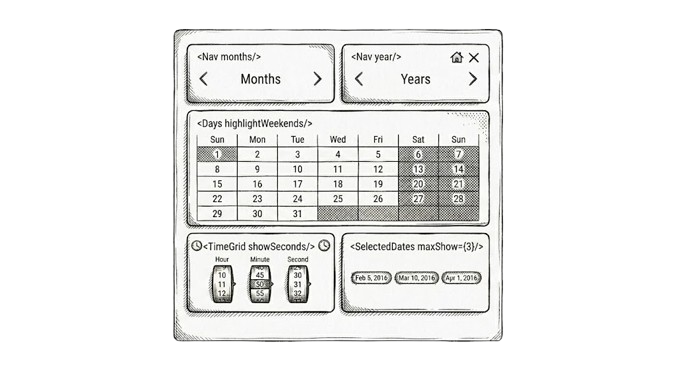
Visible behavior comes from modules placed as children: CalendarToolbar, CalendarDays, CalendarTimeWheel, CalendarPresets, CalendarSelectedDates, manual input, and track modules. You mount only the UI your product needs.
The wrapper also provides a small grid contract: cols defines equal parent tracks, and child col={number} spans that many tracks. For example, inside cols={4}, a module with col={2} takes half the row. col is a span count, not CSS grid-line syntax.
Since 3.1, a numeric cols={N} is responsive: it renders up to N equal columns and collapses toward one on narrow screens. The collapse threshold is the --cal-cols-min CSS variable (default 14em) — set it to 0px for fixed, never-collapsing tracks. col="full" places a module across the entire row, collapse-safely. String cols values stay raw grid-template-columns and never collapse.
When not to use DateForge#
DateForge is a picker composition kit, not a full calendar application or a date utility library. It is strongest when your product needs a custom date, range, or date-time picker built from small React modules.
Choose something simpler or more specialized when:
- You only need a native browser field like
<input type="date">,<input type="time">, or<input type="datetime-local">. - You want one prebuilt picker with almost no composition decisions, styling decisions, or module choices.
- You need event-calendar features: drag-and-drop events, resource columns, agenda views, recurring events, ICS import/export, or meeting scheduling logic.
- You need general date math, timezone conversion, parsing, or formatting utilities. Pair DateForge with
Temporal,date-fns,dayjs, or your app's existing date layer for that work. - You need a non-React widget, a server-rendered-only calendar, or a framework-agnostic web component.
- You need a full form field abstraction with labels, validation messages, popovers, input masks, and form-library bindings already bundled.
Modules#
Modules read calendar context directly, so there is no prop drilling. They can be reordered, repeated, or used alone. Any subset should render without crashing, but not every subset is a complete human-friendly UX.
| Module group | Modules | Primary role |
|---|---|---|
| Navigation | CalendarToolbar, CalendarMonthsGrid, CalendarYearsGrid | Move the internal viewDate without committing selection |
| Selection | CalendarDays, CalendarTimeWheel, CalendarManualInput, CalendarPresets | Commit dates, ranges, arrays, or time changes |
| Feedback | CalendarSelectedDates, CalendarInfo | Render current selection as chips, summary, or info readout |
| Tracks | CalendarDaysTrack, CalendarMonthsTrack, CalendarYearsTrack | Horizontal scrollable strips for compact / mobile layouts |
| Wheels | CalendarMonthsWheel, CalendarYearsWheel | iOS-style drum pickers for month and year, range-bound aware |
| Decorative | CalendarLunar | Lunar phase strip around selected date (display-only) |
| Custom | Store hooks from @dateforge/react-calendar/context (useCalendarStore, useStoreSelector, useCalendarActions, useUI, useLabels) | Build your own modules on top of the same store |
Selection model: unit × mode#
Two config axes decide the value shape and selection semantics: unit ("day" | "week" | "month", default "day") and mode ("single" | "multiple" | "range" | "multi-range", default "single"). The onChange shape is fully determined by the pair:
| unit × mode | Value / defaultValue | Cleared value | Best for |
|---|---|---|---|
day + single | Date | null | null | Date picker, scheduler date, time-only picker |
day + multiple | Date[] (sorted) | [] | Delivery days, shifts, events |
any single span (range, or week/month single) | { start: Date; end: Date } | null | null | Booking, reporting windows, week/month pickers |
any multi span (multi-range, week/month multiple) | { start: Date; end: Date }[] | [] | Blackout windows, multi-sprint planning |
Spans are always emitted complete — while the user is still drawing a range, the value stays null (or keeps the previous committed span). onChange also receives a second details argument (CalendarChangeDetails) with reason and segments — the business-day cut when exclude/disabled rules apply. Caps and lengths live in the config too: minSpan/maxSpan (in units), maxDates for multiple, maxRanges for multi-range.
Which modules do I need?#
Start from the product workflow, then pick modules. The calendar does not force one canonical picker.
| You want... | Compose these modules |
|---|---|
| Basic date picker | CalendarToolbar + CalendarDays |
| Range picker | CalendarToolbar + CalendarDays with config = createCalendarConfig({ mode: "range" }) |
| Date and time picker | CalendarToolbar with CalendarToolbarTime + CalendarDays, or inline CalendarTimeWheel |
| Time-only picker | CalendarTimeWheel with createCalendarConfig({ withTime: true }) |
| Month/year drum pickers | CalendarMonthsWheel + CalendarYearsWheel |
| Manual typing | CalendarManualInput, optionally with CalendarDays |
| Preset shortcuts | CalendarPresets alongside any picker modules |
| Month-only or year-only picker | CalendarMonthsGrid or CalendarYearsGrid without CalendarDays |
| Mobile / compact strips | CalendarDaysTrack, CalendarMonthsTrack, CalendarYearsTrack |
| Selection summary | CalendarSelectedDates |
| Date facts, range duration, relative time | CalendarInfo |
| Lunar phase display | CalendarLunar (decorative, no interaction) |
Import strategy#
The package is split into tree-shakeable subpaths. The aggregate paths are convenient for prototyping; per-subpath imports keep production bundles small.
| Import from | What is there | When to use |
|---|---|---|
@dateforge/react-calendar | Calendar, createCalendarConfig, factories (createTheme, createAppearance, createDisabled, definePreset), preset packs, public types | Always; root provider lives here |
@dateforge/react-calendar/prebuilt | SimpleCalendar, DatePicker, MonthPicker, MultiMonthCalendar | One-import calendars, zero composition |
@dateforge/react-calendar/modules | All Calendar* modules (days, tracks, wheels, info, etc.) | Prototyping; grab all at once |
@dateforge/react-calendar/modules/<name> | One module - e.g. modules/days, modules/time, modules/lunar | Production bundle hygiene |
@dateforge/react-calendar/modules/toolbar | All CalendarToolbar* sub-components | Toolbar composition |
@dateforge/react-calendar/context | Store hooks: useCalendarStore, useStoreSelector, useCalendarActions, useUI, useLabels | Building custom modules |
@dateforge/react-calendar/themes | All 28 theme families (named exports + THEMES) | Theme objects; tree-shaken per import |
@dateforge/react-calendar/appearances | All 8 appearance objects (+ createAppearance, token sets) | Appearance objects; tree-shaken per import |
Built-in themes and appearances can also be referenced by plain string name (theme="dracula", appearance="zenith") — the generated stylesheet resolves them at runtime. Strings keep every palette reachable; imported objects tree-shake to just the ones you use.
Toolbar imports — all toolbar primitives ship together on one subpath (the module is one bundle; unused primitives tree-shake out):
import {
  CalendarToolbar,
  CalendarToolbarPrev,
  CalendarToolbarMonthTrigger,
  CalendarToolbarYearTrigger,
  CalendarToolbarNext,
  CalendarToolbarClear,
  CalendarToolbarHome,
  CalendarToolbarThemeToggle,
  CalendarToolbarTime,
  CalendarToolbarLabel,
} from "@dateforge/react-calendar/modules/toolbar";
Module imports - two patterns:
// Aggregate
import { CalendarDays, CalendarTimeWheel, CalendarLunar } from "@dateforge/react-calendar/modules";

// Per-module
import { CalendarDays } from "@dateforge/react-calendar/modules/days";
import { CalendarTimeWheel } from "@dateforge/react-calendar/modules/time";
import { CalendarLunar } from "@dateforge/react-calendar/modules/lunar";
import { CalendarMonthsWheel } from "@dateforge/react-calendar/modules/months-wheel";
import { CalendarYearsWheel } from "@dateforge/react-calendar/modules/years-wheel";
Performance with multiple calendars#
Three or more visible calendars are reasonable, but treat them as a layout and state-design decision. Most slowdowns come from mounting more modules than the screen needs, recreating config objects on every parent render, or rendering several independent providers when one shared calendar state would do.
For a year-style picker, prefer one <Calendar> with multiple offset nav/day pairs instead of twelve separate calendars:
const config = createCalendarConfig({ mode: "range" });

<Calendar config={config} value={range} onChange={handleChange} cols={3} appearance={compact}>
  {/* offset 0 — only calendar with prev/next and year trigger */}
  <CalendarToolbar col={1} offset={0}>
    <CalendarToolbarPrev />
    <CalendarToolbarMonthTrigger />
    <CalendarToolbarNext />
    <CalendarToolbarYearTrigger compact />
  </CalendarToolbar>
  {/* offsets 1–11 — month + year labels only, no arrows */}
  <CalendarToolbar col={1} offset={1}><CalendarToolbarMonthLabel /><CalendarToolbarYearLabel /></CalendarToolbar>
  <CalendarToolbar col={1} offset={2}><CalendarToolbarMonthLabel /><CalendarToolbarYearLabel /></CalendarToolbar>
  <CalendarDays col={1} showOutsideDays={false} fixedWeeks={false} />
  <CalendarDays col={1} offset={1} showOutsideDays={false} fixedWeeks={false} />
  <CalendarDays col={1} offset={2} showOutsideDays={false} fixedWeeks={false} />
  <CalendarToolbar col={1} offset={3}><CalendarToolbarMonthLabel /><CalendarToolbarYearLabel /></CalendarToolbar>
  <CalendarToolbar col={1} offset={4}><CalendarToolbarMonthLabel /><CalendarToolbarYearLabel /></CalendarToolbar>
  <CalendarToolbar col={1} offset={5}><CalendarToolbarMonthLabel /><CalendarToolbarYearLabel /></CalendarToolbar>
  <CalendarDays col={1} offset={3} showOutsideDays={false} fixedWeeks={false} />
  <CalendarDays col={1} offset={4} showOutsideDays={false} fixedWeeks={false} />
  <CalendarDays col={1} offset={5} showOutsideDays={false} fixedWeeks={false} />
  <CalendarToolbar col={1} offset={6}><CalendarToolbarMonthLabel /><CalendarToolbarYearLabel /></CalendarToolbar>
  <CalendarToolbar col={1} offset={7}><CalendarToolbarMonthLabel /><CalendarToolbarYearLabel /></CalendarToolbar>
  <CalendarToolbar col={1} offset={8}><CalendarToolbarMonthLabel /><CalendarToolbarYearLabel /></CalendarToolbar>
  <CalendarDays col={1} offset={6} showOutsideDays={false} fixedWeeks={false} />
  <CalendarDays col={1} offset={7} showOutsideDays={false} fixedWeeks={false} />
  <CalendarDays col={1} offset={8} showOutsideDays={false} fixedWeeks={false} />
  <CalendarToolbar col={1} offset={9}><CalendarToolbarMonthLabel /><CalendarToolbarYearLabel /></CalendarToolbar>
  <CalendarToolbar col={1} offset={10}><CalendarToolbarMonthLabel /><CalendarToolbarYearLabel /></CalendarToolbar>
  <CalendarToolbar col={1} offset={11}><CalendarToolbarMonthLabel /><CalendarToolbarYearLabel /></CalendarToolbar>
  <CalendarDays col={1} offset={9} showOutsideDays={false} fixedWeeks={false} />
  <CalendarDays col={1} offset={10} showOutsideDays={false} fixedWeeks={false} />
  <CalendarDays col={1} offset={11} showOutsideDays={false} fixedWeeks={false} />
  <CalendarSelectedDates col={3} />
</Calendar>
Keep expensive props stable when the parent rerenders:
- Compile the config once:
useMemo(() => createCalendarConfig({...}), [...])or module scope. A new config object on every render forces every module to re-read state. - Keep custom
presets,theme, andappearanceobjects outside render or behinduseMemo. - Mount only the modules the current surface needs; avoid three
CalendarTimeWheelor track stacks unless all are visible and interactive. - Import theme/appearance objects from the barrels for production bundles; string names keep the full generated stylesheet reachable.
- In long forms, consider mounting the picker only when its popover, tab, or step is active.
Measure in production mode on the target device class. Dev mode and React Strict Mode exaggerate render work.
import { Profiler } from "react";

function onCalendarRender(
  id: string,
  phase: "mount" | "update" | "nested-update",
  actualDuration: number,
  baseDuration: number,
) {
  console.table({
    id,
    phase,
    actualDuration: `${actualDuration.toFixed(1)}ms`,
    baseDuration: `${baseDuration.toFixed(1)}ms`,
  });
}

<Profiler id="booking-calendar" onRender={onCalendarRender}>
  <BookingCalendar />
</Profiler>
Useful checks:
- React DevTools Profiler: record initial mount, next/previous month, day selection, range hover, and preset click.
- Chrome Performance panel: throttle CPU, record the same interactions, and watch scripting time plus input delay.
- Browser Performance API: wrap product-specific work inside
performance.mark()andperformance.measure()around handlers that react toonChange. - Bundle inspection: compare aggregate imports against per-theme and per-appearance subpaths when bundle size matters.
- Real user metrics: watch INP and long tasks on pages where calendars are visible by default.
When does each action fire onChange?#
The rule of thumb is simple: navigation changes the view, selection commits values.
| Action | Changes viewDate | Changes selection | Fires onChange |
|---|---|---|---|
| Toolbar | |||
CalendarToolbar prev / next / home | yes | no | no |
CalendarToolbarMonthTrigger / CalendarToolbarYearTrigger popup | yes | no | no |
| Day grid | |||
CalendarDays day click | if cross-month | yes | yes |
CalendarDays keyboard navigation | if cross-month | no | no |
CalendarTimeWheel drum scroll | yes | yes | yes |
Tracks (CalendarDaysTrack, CalendarMonthsTrack, CalendarYearsTrack) | |||
Track scroll without bound | yes | no | no |
Track scroll with bound | yes | yes | yes |
Wheels (CalendarMonthsWheel, CalendarYearsWheel) | |||
Wheel spin without bound | yes | no | no |
Wheel spin with bound | yes | yes | yes |
| Other | |||
CalendarPresets click | yes | yes | yes |
CalendarSelectedDates chip click | yes | no | no |
CalendarSelectedDates per-chip remove | no | yes | yes |
| Clear buttons | no | yes | yes |
readOnly blocks every selection-affecting action, but navigation stays enabled. UI-only state like popup open/close and theme toggles does not fire onChange.
Controlled and uncontrolled#
Controlled mode starts when value is provided, including null. User actions fire onChange with the next value, but rendered selection stays tied to the value you pass back.
const config = createCalendarConfig();
const [date, setDate] = useState<Date | null>(null);

<Calendar config={config} value={date} onChange={(value) => setDate(value as Date | null)}>
  <CalendarToolbar>
    <CalendarToolbarPrev />
    <CalendarToolbarMonthTrigger />
    <CalendarToolbarNext />
    <CalendarToolbarYearTrigger compact />
  </CalendarToolbar>
  <CalendarDays />
</Calendar>
Uncontrolled mode starts when value is undefined. defaultValue seeds the reducer once on mount, internal state owns future changes, and onChange still fires.
<Calendar config={config} defaultValue={new Date()} onChange={(date) => console.log(date)}>
  <CalendarDays />
</Calendar>
When both value and defaultValue are passed, value wins. If you swap in a config with a different unit/mode at runtime, pass a compatible value at the same time; selection shape is not migrated for you.
Accessibility labels#
DateForge ships English aria-label defaults for icon buttons, toolbars, dialogs, spinbuttons, tracks, and overflow controls. In v3 they live in one labels registry instead of dozens of per-component props. Resolution is tiered: module prop → root labels → English default.
Pass a partial registry to <Calendar labels={...}> to localize globally; a handful of modules keep small per-instance overrides (e.g. clearLabel on CalendarSelectedDates, weekLabel on CalendarDays).
<Calendar
  config={config}
  labels={{
    clear: "Buchung löschen",
    previousMonth: "Vorheriger Monat",
    nextMonth: "Nächster Monat",
    selectMonth: "Monat wählen",
    selectYear: "Jahr wählen",
    announceSelected: "{date} ausgewählt",
  }}
>
  <CalendarToolbar>
    <CalendarToolbarPrev />
    <CalendarToolbarMonthTrigger />
    <CalendarToolbarNext />
    <CalendarToolbarYearTrigger compact />
  </CalendarToolbar>
  <CalendarDays weekLabel="ISO-Woche" />
  <CalendarSelectedDates allowClear removeDateLabel="Datum entfernen" />
</Calendar>
Templated labels keep their placeholder names — DateForge interpolates {month}, {year}, {time}, {period}, {count}, {date}, {from}, and {to} where the module has that value available.
Registry keys by area:
| Area | Keys |
|---|---|
| Core actions | clear, apply, confirm, home, remove |
| Navigation | previousDay, previousMonth, previousYear, previousYears, nextDay, nextMonth, nextYear, nextYears, calendarNavigation |
| Time | hours, minutes, seconds, selectTime, changeTime, timePeriod, resetTime, timePicker |
| Months | selectMonth, changeMonth, currentMonth, monthSelected, monthGrid, monthPicker, resetMonth, monthTrack |
| Years | selectYear, changeYear, currentYear, yearSelected, yearGrid, yearPicker, resetYear, yearTrack, yearPageNavigation |
| Selection | manualInput, rangeFrom, rangeTo, noDate, removeSelectedDate, saveSelectedDate, removeRangeStart, removeRangeEnd, showMoreSelectedDates |
| Announcements & misc | announceSelected, announceCleared, themeToggle, themeSwitchToLight, themeSwitchToDark, currentDay, dayTrack, week, lunar, infoRanges |
The exact LabelOverrides type ships with the package — your editor autocompletes every key.
Right-to-left (RTL)#
The calendar is RTL-ready through CSS logical properties. It deliberately does not set dir itself — it inherits from the document or any ancestor (<html dir="rtl">, or dir on a wrapper). Direction-bearing chevrons mirror automatically (data-flip-rtl), including inside portalled popups, and toolbar arrow-key navigation follows the direction.
<div dir="rtl">
  <Calendar config={createCalendarConfig({ locale: "ar" })}>
    <CalendarToolbar>
      <CalendarToolbarPrev />
      <CalendarToolbarMonthTrigger />
      <CalendarToolbarNext />
    </CalendarToolbar>
    <CalendarDays />
  </Calendar>
</div>
Dev warnings#
Malformed input never throws — it degrades to a safe fallback and warns once per distinct message, in non-production builds only, prefixed [dateforge]:
| Id | Fires when |
|---|---|
invalidFirstDayOfWeek | firstDayOfWeek outside 0–6 (normalized) |
invalidMinMax | min is after max — nothing is selectable |
malformedDateRule | a disabled/exclude rule entry was skipped (Invalid Date, bad bound) |
invalidTimeZone | unknown zone — fell back to the system zone |
invalidValue | an entry in value/defaultValue was dropped (Invalid Date, wrong shape, array in single mode) |
emptySelectionAfterExclude | exclude rules removed every day of a span; nothing committed |
maxRangesReached | a new range was ignored at the maxRanges cap |
invalidPreset | a preset entry was skipped (null, missing label/id) |
duplicatePresetId | two presets share an id — first wins |
presetResolveError | a preset resolver threw — treated as empty |
schemeChangeIgnored | scheme changed on an uncontrolled calendar (no onSchemeChange) or a prebuilt |
User-facing rejections (clicking a disabled day, exceeding a cap, an out-of-order time) are not warnings — they surface through the root onValidationReject prop, see Calendar.
Ready-made module sets#
These are starting points rather than exported presets. Copy the shape, then add constraints, disabled rules, themes, or appearances.
Minimal single date#
const config = createCalendarConfig();

<Calendar config={config} value={date} onChange={(value) => setDate(value as Date | null)}>
  <CalendarToolbar>
    <CalendarToolbarPrev />
    <CalendarToolbarMonthTrigger />
    <CalendarToolbarNext />
    <CalendarToolbarYearTrigger compact />
  </CalendarToolbar>
  <CalendarDays />
</Calendar>
Booking range#
const config = createCalendarConfig({ mode: "range" });

// value: { start: Date; end: Date } | null
<Calendar config={config} value={range} onChange={handleChange}>
  <CalendarToolbar>
    <CalendarToolbarPrev />
    <CalendarToolbarMonthTrigger />
    <CalendarToolbarNext />
    <CalendarToolbarYearTrigger compact />
    <CalendarToolbarClear />
  </CalendarToolbar>
  <CalendarDays />
  <CalendarSelectedDates allowClear allowNavigate />
</Calendar>
Analytics range with presets#
import { type PresetInput } from "@dateforge/react-calendar";

const config = createCalendarConfig({ mode: "range" });

const analyticsPresets: PresetInput[] = [
  { label: "Last 7 days", value: -6, range: 6 },
  { label: "Last 30 days", value: -29, range: 29 },
  { label: "Next sprint", value: 0, range: 13 },
];

<Calendar config={config} value={range} onChange={handleChange}>
  <CalendarPresets presets={analyticsPresets} />
  <CalendarToolbar>
    <CalendarToolbarPrev />
    <CalendarToolbarMonthTrigger />
    <CalendarToolbarNext />
    <CalendarToolbarYearTrigger compact />
  </CalendarToolbar>
  <CalendarDays />
  <CalendarSelectedDates />
</Calendar>
Date and time#
const config = createCalendarConfig({
  withTime: true,
  defaultTime: { hour: 10, minute: 30 },
});

<Calendar config={config} value={date} onChange={(value) => setDate(value as Date | null)}>
  <CalendarToolbar>
    <CalendarToolbarPrev />
    <CalendarToolbarMonthTrigger />
    <CalendarToolbarNext />
    <CalendarToolbarYearTrigger compact />
    <CalendarToolbarTime />
  </CalendarToolbar>
  <CalendarDays />
  <CalendarTimeWheel />
</Calendar>
Mobile tracks#
const config = createCalendarConfig({ mode: "range" });

<Calendar config={config} value={range} onChange={handleChange}>
  <CalendarYearsTrack />
  <CalendarMonthsTrack />
  <CalendarDaysTrack bound="from" />
  <CalendarDaysTrack bound="to" />
  <CalendarSelectedDates />
</Calendar>
Prebuilt components#
Skip composition entirely: @dateforge/react-calendar/prebuilt ships four ready recipes over the same primitives, with plain-Date props (value, defaultValue, onChange, locale, min/max, disabled, readOnly, theme, appearance, gradient, scheme, and a config escape hatch for extra createCalendarConfig options).
import { useState } from "react";
import {
  SimpleCalendar,
  DatePicker,
  MonthPicker,
  MultiMonthCalendar,
} from "@dateforge/react-calendar/prebuilt";

const [date, setDate] = useState<Date | null>(null);

// Plain-Date props — no config, no composition
<SimpleCalendar value={date} onChange={setDate} />          // header + day grid
<DatePicker onChange={setDate} />                           // typed input + grid + Today jump
<MonthPicker onChange={setMonth} />                         // year stepper + 12-month grid
<MultiMonthCalendar months={6} cols={3} mode="range" /> // 6-month range boardSimpleCalendar#
The default calendar: month/year navigation header + day grid, single-date selection. One import and done.
import { useState } from "react";
import { SimpleCalendar } from "@dateforge/react-calendar/prebuilt";

const [date, setDate] = useState<Date | null>(null);

// The default calendar: month/year navigation header + day grid.
<SimpleCalendar value={date} onChange={setDate} />

// Same shared props everywhere: locale, min/max, disabled, readOnly,
// theme, appearance, gradient, scheme, and a config escape hatch.
<SimpleCalendar
  defaultValue={new Date()}
  locale="de-DE"
  min={new Date()}
  theme="noir"
  appearance="zenith"
/>DatePicker#
Typed, segment-based manual input above the calendar, plus a Today jump — keyboard-first single-date entry with the grid as fallback. allowClear (default true) controls the clear button inside the manual input — pass false to hide it.
import { useState } from "react";
import { DatePicker } from "@dateforge/react-calendar/prebuilt";

const [date, setDate] = useState<Date | null>(null);

// Typed, segment-based input above the grid, plus a Today jump —
// keyboard-first entry with the grid as fallback.
<DatePicker value={date} onChange={setDate} disabled={{ weekends: true }} />MonthPicker#
Year-stepping header + 12-month grid; picking a month selects the whole month (unit: "month" under the hood), reported as its first day.
import { useState } from "react";
import { MonthPicker } from "@dateforge/react-calendar/prebuilt";

const [month, setMonth] = useState<Date | null>(null);

// Year-stepping header + 12-month grid (unit: "month" under the hood).
// Picking a month selects the whole month, reported as its first day.
<MonthPicker value={month} onChange={setMonth} />MultiMonthCalendar#
3, 6, or 12 consecutive months in a grid, generated on the fly. One shared selection spans the whole board — ranges drag across months. Prev/next arrows on the first and last header step the whole board.
import { MultiMonthCalendar } from "@dateforge/react-calendar/prebuilt";

// 3/6/12 consecutive months in a grid, generated on the fly.
// One shared selection spans the whole board — ranges drag across months.
<MultiMonthCalendar
  months={6}
  cols={3}
  mode="range"
  startMonth={new Date(2026, 6, 1)}
  onChange={(range, details) => console.log(range, details.reason)}
/>
Prebuilt scheme is a seed, not a controlled prop: prebuilts take no onSchemeChange, so changing scheme after mount is ignored (with a schemeChangeIgnored dev warning). To drive light/dark from outside, either remount with key={scheme} — simple, but the swap is instant, with no color transition — or compose the same layout on <Calendar scheme={scheme} onSchemeChange={setScheme}> to keep one instance and let the colors animate.
When a prebuilt stops fitting, drop one level down to the modules — every prebuilt is just Calendar + modules + createCalendarConfig inside. SimpleCalendar, for example, is:
<Calendar config={createCalendarConfig({ mode: "single" })}>
  <CalendarToolbar cols="auto minmax(0, 1fr) auto">
    <CalendarToolbarPrev />
    <CalendarToolbarGroup>
      <CalendarToolbarMonthTrigger />
      <CalendarToolbarYearTrigger />
    </CalendarToolbarGroup>
    <CalendarToolbarNext />
  </CalendarToolbar>
  <CalendarDays />
</Calendar>
Week and month selection#
unit switches what one click selects. unit: "week" selects whole weeks, unit: "month" whole months — both emit { start, end } spans:
const config = createCalendarConfig({ unit: "week" });

// One click selects the whole week.
// value: { start: Date; end: Date } | null
<Calendar config={config} value={week} onChange={(value) => setWeek(value as { start: Date; end: Date } | null)}>
  <CalendarToolbar>
    <CalendarToolbarPrev />
    <CalendarToolbarMonthTrigger />
    <CalendarToolbarNext />
    <CalendarToolbarYearTrigger compact />
  </CalendarToolbar>
  <CalendarDays weekNumbers />
</Calendar>
Multiple ranges#
mode: "multi-range" collects several { start, end } spans, capped by maxRanges. CalendarSelectedDates renders one chip pair per span with per-chip removal:
const config = createCalendarConfig({ mode: "multi-range", maxRanges: 3 });

// value: { start: Date; end: Date }[]
<Calendar config={config} value={ranges} onChange={(value) => setRanges(value as { start: Date; end: Date }[])}>
  <CalendarToolbar>
    <CalendarToolbarPrev />
    <CalendarToolbarMonthTrigger />
    <CalendarToolbarNext />
    <CalendarToolbarYearTrigger compact />
  </CalendarToolbar>
  <CalendarDays />
  <CalendarSelectedDates allowClear allowClearPerChip />
</Calendar>
Business days: exclude#
exclude keeps days spannable but cuts them from the emitted value — the classic "10 business days" flow. onChange details report the resulting segments:
const config = createCalendarConfig({
  mode: "range",
  exclude: { weekends: true },           // cut from emitted spans, still spannable
  excludedEndpointPolicy: "snap-inward", // or "reject"
});

<Calendar
  config={config}
  value={range}
  onChange={(value, details) => {
    setRange(value as { start: Date; end: Date } | null);
    // value = the logical span the user drew;
    // details.segments = the surviving business-day segments
    console.log(details.segments);
  }}
>
  <CalendarDays />
  <CalendarSelectedDates allowClear />
</Calendar>
Time, time zones, and DST#
withTime adds a time of day to selected values; minTime/maxTime clamp the selectable window in the core (wheels, toolbar time, and manual input all respect it):
const config = createCalendarConfig({
  withTime: true,
  defaultTime: { hour: 9 },   // applied to a freshly picked day
  minTime: { hour: 9 },       // inclusive wall-clock floor for every day
  maxTime: { hour: 18 },      // inclusive ceiling — drums and steppers gate to it
});

<Calendar config={config} value={date} onChange={(value) => setDate(value as Date | null)}>
  <CalendarDays />
  <CalendarTimeWheel labels="short" />
</Calendar>
timeZone pins "today" resolution to an IANA zone, DST-safe, with explicit policies for ambiguous and nonexistent wall-clock times:
const config = createCalendarConfig({
  timeZone: "Asia/Tokyo", // IANA zone — "today" resolves in Tokyo, not the browser zone
});

// The today dot, CalendarToolbarHome, and presetToday all agree on
// what "today" means, even across the date line.
<Calendar config={config} value={date} onChange={(value) => setDate(value as Date | null)}>
  <CalendarDays />
</Calendar>
Module reference#
Calendar#
The root wrapper and context provider. Owns all shared state - mode, value, view date, locale, timezone, theme, appearance, disabled rules, and range constraints - and distributes it to every child module via context. Renders no UI of its own; all visible output comes from the modules you place inside it.
import { Calendar, createCalendarConfig } from "@dateforge/react-calendar";

// Behavior lives in the config — compiled once, shared by every module.
const config = createCalendarConfig({
  mode: "single",          // "single" | "multiple" | "range" | "multi-range"
  unit: "day",             // "day" | "week" | "month"
  locale: "en-US",         // BCP 47 — month names, weekday labels, week start
  min: new Date(),         // nothing before today is selectable
  disabled: { weekends: true },
});

<Calendar
  config={config}
  value={date}
  onChange={(value, details) => setDate(value as Date | null)}
  theme="dracula"          // built-in name, or an imported ThemeFamily object
  appearance={soft}        // built-in name, imported object, or createAppearance()
  scheme="auto"            // "auto" | "light" | "dark"
>
  <CalendarToolbar>
    <CalendarToolbarPrev />
    <CalendarToolbarMonthTrigger />
    <CalendarToolbarNext />
    <CalendarToolbarYearTrigger compact />
  </CalendarToolbar>
  <CalendarDays />
  <CalendarSelectedDates allowClear allowNavigate />
</Calendar>createCalendarConfig#
Everything behavioral lives in the config — compiled once, shared by every module:
| Option | Type | Default | Description |
|---|---|---|---|
mode | "single" | "multiple" | "range" | "multi-range" | "single" | Selection mode |
unit | "day" | "week" | "month" | "day" | Selection unit — week/month selection picks whole spans |
locale | string | env | BCP-47 locale for names, digits, and week start (via Intl) |
firstDayOfWeek | 0–6 | from locale | Week start override (0 = Sunday) |
min / max | Date | - | Earliest / latest selectable day (inclusive) |
disabled | DateRuleConfig | engine | - | Days that cannot be picked |
exclude | DateRuleConfig | engine | - | Days cut out of emitted spans (business-day flows); segments reported in details |
excludedEndpointPolicy | "snap-inward" | "reject" | "snap-inward" | What happens when a span endpoint lands on an excluded day |
readOnly | boolean | false | Block all selection; navigation stays active |
deselectOnReclick | boolean | true | Clicking the selected day deselects it |
withTime | boolean | false | Selected values carry a time of day |
hour12 / ampmLabels | boolean / { am, pm } | 24h | 12-hour clock and localized AM/PM labels |
defaultTime | { hour?, minute?, second? } | - | Time applied to a freshly picked day |
minTime / maxTime | { hour?, minute?, second? } | - | Inclusive selectable time-of-day window, enforced by the core |
weekendDays | number[] | Sat/Sun | Which columns count as weekend |
minSpan / maxSpan | number | - | Span length limits in units (range modes) |
maxDates | number | - | Cap on point selections (multiple) |
maxRanges | number | - | Cap on spans (multi-range) |
timeZone | string | env | IANA zone for "today" resolution, DST-safe |
CalendarToolbar#
Composable navigation bar. Place sub-components as children to compose exactly the toolbar your product needs. Controls the internal viewDate - does not commit selection.
The default layout (no cols) is a wrapping flex row: overflow wraps to the next line instead of escaping the container, rows distribute space-between, and an over-wide label shrinks with an ellipsis. Passing cols switches to the explicit grid mode, which never wraps.
import {
  CalendarToolbar,
  CalendarToolbarPrev,
  CalendarToolbarMonthTrigger,
  CalendarToolbarYearTrigger,
  CalendarToolbarNext,
} from "@dateforge/react-calendar/modules/toolbar";

<CalendarToolbar>
  <CalendarToolbarPrev />
  <CalendarToolbarMonthTrigger />
  <CalendarToolbarNext />
  <CalendarToolbarYearTrigger compact />
</CalendarToolbar><Calendar config={config} value={date} onChange={(value) => setDate(value as Date | null)}>
<CalendarToolbar>
<CalendarToolbarPrev />
<CalendarToolbarMonthTrigger />
<CalendarToolbarNext />
<CalendarToolbarYearTrigger compact />
<CalendarToolbarHome />
<CalendarToolbarClear />
</CalendarToolbar>
</Calendar>Sub-components (all imported from @dateforge/react-calendar/modules/toolbar):
| Component | Description |
|---|---|
CalendarToolbarPrev | Navigate to previous month/year |
CalendarToolbarNext | Navigate to next month/year |
CalendarToolbarMonthTrigger | Clickable month label with picker popup. compact for drum picker |
CalendarToolbarYearTrigger | Clickable year label with picker popup. compact for drum picker |
CalendarToolbarMonthLabel | Read-only month display (no popup) |
CalendarToolbarYearLabel | Read-only year display (no popup) |
CalendarToolbarTime | Time picker trigger (popup with hour/minute drums) |
CalendarToolbarClear | Clear selection button |
CalendarToolbarHome | Reset to current month button |
CalendarToolbarThemeToggle | Dark/light mode toggle |
CalendarToolbarClock | Live clock display (ticks every second; isolated re-render) |
CalendarToolbarDayLabel | Read-only current day-of-week label |
CalendarToolbarLabel | Static text label |
CalendarToolbarGroup | Flex group wrapper - grow fills remaining space; push="start" | "end" pins the group to a toolbar edge in the wrapping flex layout (in cols grid mode the auto margin applies within the group's own cell — prefer col placement there) |
CalendarDays#
The main day grid. Renders a month view and commits selection on click. Works across all three modes - single, multiple, and range - adapting highlight and click semantics automatically.
<Calendar config={config} value={date} onChange={(value) => setDate(value as Date | null)}>
  <CalendarDays highlightWeekends weekNumbers todayDot />
</Calendar>CalendarTimeWheel#
Drum-scroll time picker for hours, minutes, and optionally seconds. Pairs with CalendarDays for a full date-time picker, or stands alone as a time-only input with createCalendarConfig({ withTime: true }).
const config = createCalendarConfig({ withTime: true });

<Calendar config={config} value={date} onChange={(value) => setDate(value as Date | null)}>
  <CalendarTimeWheel seconds labels="long" step={{ minute: 5 }} />
</Calendar>CalendarPresets#
Shortcut buttons that jump to predefined dates or ranges with a single click. Presets are explicit: pass your own array, commonPresets, relativePresets, or individual exports like presetToday / presetLast7Days. If presets is omitted or empty, the module renders no buttons.
import { Calendar, commonPresets, createCalendarConfig } from "@dateforge/react-calendar";
import { CalendarPresets } from "@dateforge/react-calendar/modules";

const config = createCalendarConfig({ mode: "range" });

<Calendar config={config} value={range} onChange={handleChange}>
  <CalendarPresets presets={commonPresets} />
</Calendar>CalendarSelectedDates#
Renders the current selection as chips. In range mode shows from/to bounds; in multiple mode shows one chip per date. Chips can navigate to their date or clear individual entries.
<Calendar config={rangeConfig} value={range} onChange={handleChange}>
  <CalendarSelectedDates allowClear allowNavigate showTime />
</Calendar>CalendarManualInput#
Free-text date input that parses typed values and syncs them with calendar state. Useful when users know the exact date and prefer typing over clicking.
<Calendar config={config} value={date} onChange={(value) => setDate(value as Date | null)}>
  <CalendarManualInput allowClear />
</Calendar>CalendarInfo#
Read-only summary of the current selection. In single mode prints the date; in multiple prints a count and list; in range prints the bounds plus a duration or day count. Use to surface "facts about the value" - relative time, range length, ISO summary - without rebuilding selection chips. Pass a formatter for fully custom output.
<Calendar config={rangeConfig} value={range} onChange={handleChange}>
  <CalendarDays />
  <CalendarInfo showRelative showSummary rangeStyle="duration" />
</Calendar>CalendarDaysTrack#
Horizontal drum scroller for day selection. Designed for mobile-first layouts. Use bound to tie each drum to the from or to side of a range independently.
<Calendar config={rangeConfig} value={range} onChange={handleChange}>
  <CalendarDaysTrack bound="from" showMonthLabel />
  <CalendarDaysTrack bound="to" showMonthLabel />
</Calendar>CalendarMonthsTrack#
Drum scroller for month navigation. Scrolling moves the internal viewDate without committing selection. Combine with CalendarDaysTrack for a full mobile drum picker.
<Calendar config={config} value={date} onChange={(value) => setDate(value as Date | null)}>
  <CalendarMonthsTrack short showYearLabel />
</Calendar>CalendarYearsTrack#
Drum scroller for year navigation. Works the same way as CalendarMonthsTrack but scrolls through years. Stack all three track modules for a compact iOS-style date picker.
<Calendar config={config} value={date} onChange={(value) => setDate(value as Date | null)}>
  <CalendarYearsTrack />
</Calendar>CalendarMonthsGrid#
12-cell month grid for month-only pickers or fast month navigation. Clicking a cell moves viewDate to that month. Use onMonthSelect to build a standalone month picker without CalendarDays.
<Calendar config={config} value={date} onChange={(value) => setDate(value as Date | null)}>
  <CalendarMonthsGrid short />
</Calendar>CalendarYearsGrid#
Paginated year grid for year-only pickers or quick year jumps. Pairs with CalendarMonthsGrid to build a full month-year selector without the day view.
<Calendar config={config} value={date} onChange={(value) => setDate(value as Date | null)}>
  <CalendarYearsGrid showControls yearsPerPage={12} />
</Calendar>CalendarMonthsWheel#
iOS-style drum picker for months. Range-bound aware - pass bound="from" or bound="to" to edit one boundary independently.
<Calendar config={rangeConfig} value={range} onChange={handleChange}>
  <CalendarMonthsWheel showLabel showReset />
</Calendar>CalendarYearsWheel#
iOS-style drum picker for years. Range-bound aware.
<Calendar config={rangeConfig} value={range} onChange={handleChange}>
  <CalendarYearsWheel showLabel showReset />
</Calendar>CalendarLunar#
Informational lunar phase strip centered around the selected date. Display-only - no interaction, no onChange.
<Calendar config={config} value={date} onChange={(value) => setDate(value as Date | null)}>
  <CalendarToolbar>
    <CalendarToolbarPrev />
    <CalendarToolbarMonthTrigger />
    <CalendarToolbarNext />
    <CalendarToolbarYearTrigger compact />
  </CalendarToolbar>
  <CalendarDays />
  <CalendarLunar />
</Calendar>Custom day rendering#
CalendarDays accepts a renderDay prop to replace the contents of each day cell with your own JSX - weather icons, price tags, activity heatmaps, event dots, anything. Selection, hover, keyboard navigation, range painting, and disabled handling stay owned by the module; you only swap the visual content inside the cell.
import { CalendarDays, type DayRenderState } from "@dateforge/react-calendar/modules/days";

type RenderDay = (date: CalendarDate, state: DayRenderState) => React.ReactNode;
The callback receives the cell's CalendarDate ({ year, month, day }, month 1-12) and a DayRenderState flag bag:
| Flag | Meaning |
|---|---|
selected | Cell is part of the current selection |
today | Cell is today |
disabled | Cell is disabled by disabled / min / max rules |
excluded | Cell is cut out of emitted spans by exclude rules |
weekend | Cell falls on a weekend |
inRange | Cell is inside the active span |
rangeStart / rangeEnd | Cell is a span bound |
preview | Cell is inside the hover preview while drawing a range |
outside | Cell belongs to an adjacent leading / trailing month |
A few things to keep in mind:
- The cell is the positioning context. To paint a full-cell background (heatmaps, tints), return an absolutely-positioned element with
inset: 0andborderRadius: "inherit"so it follows the appearance radius, then render the number above it withposition: "relative". - Handle
outsideexplicitly. Usually render just the number so leading / trailing days stay muted and keep the built-in outside-month contrast treatment. - Pass a stable reference. Each cell subscribes to its own state bitmask, so only cells whose flags change re-render — but an inline
renderDayclosure re-renders all 42 cells every pass. Define it at module scope or inuseCallback. - Keep it pure and cheap. Derive per-day data deterministically - or memoize a lookup - so cells stay stable across renders.
Weather example
Each in-month day shows its number plus a deterministic weather emoji:
const WEATHER_ICONS = ["☀️", "⛅", "☁️", "🌧", "⛈", "❄️"];

// Stable per-day value so a given date always renders the same icon.
// renderDay hands you a CalendarDate ({ year, month, day }, month 1-12).
const seededRandom = (d: CalendarDate) => {
  const seed = d.year * 10000 + d.month * 100 + d.day;
  const x = Math.sin(seed) * 10000;
  return x - Math.floor(x);
};
const weatherFor = (d: CalendarDate) =>
  WEATHER_ICONS[Math.floor(seededRandom(d) * WEATHER_ICONS.length)];

const config = createCalendarConfig();

<Calendar config={config} value={date} onChange={(value) => setDate(value as Date | null)}>
  <CalendarToolbar>
    <CalendarToolbarPrev />
    <CalendarToolbarMonthTrigger />
    <CalendarToolbarNext />
    <CalendarToolbarYearTrigger compact />
  </CalendarToolbar>
  <CalendarDays
    renderDay={(d, state) => {
      if (state.outside) return <span>{d.day}</span>;
      return (
        <span
          style={{
            display: "flex",
            flexDirection: "column",
            alignItems: "center",
            gap: 2,
            lineHeight: 1.1,
          }}
        >
          <span style={{ fontSize: 13 }}>{d.day}</span>
          <span aria-hidden style={{ fontSize: 13 }}>
            {weatherFor(d)}
          </span>
        </span>
      );
    }}
  />
</Calendar>
The same pattern drives the heatmap, ticket-price, and event-dot recipes on the examples page.
Disabled dates#
Pass a DateRuleConfig object (or a precompiled createDisabled() engine) to disabled in createCalendarConfig(). Rules combine with OR logic: a date is disabled if any rule matches it. The same rule shape powers exclude — days that stay spannable but are cut out of the emitted spans (business-day flows), with the resulting segments reported in the onChange details.
Disabled dates example
import { Calendar, createCalendarConfig } from "@dateforge/react-calendar";

const config = createCalendarConfig({
  disabled: {
    weekends: true,
    before: new Date(),
    dates: [new Date(2026, 5, 10), new Date(2026, 5, 11)],
  },
});

<Calendar config={config} value={date} onChange={(value) => setDate(value as Date | null)}>
  <CalendarToolbar>
    <CalendarToolbarPrev />
    <CalendarToolbarMonthTrigger />
    <CalendarToolbarNext />
    <CalendarToolbarYearTrigger compact />
  </CalendarToolbar>
  <CalendarDays />
</Calendar>| Option | Type | Description |
|---|---|---|
weekends | boolean | Disable Saturday and Sunday |
weekdays | number[] | Disable specific weekdays (0 = Sun, 6 = Sat) |
before | Date | Disable all dates before this date |
after | Date | Disable all dates after this date |
dates | Date[] | Disable individual dates |
ranges | Array<{ start: Date; end: Date }> | Disable date ranges |
predicate | (date: CalendarDate) => boolean | Arbitrary match — evaluated last, never cached |
all | boolean | Disable every date (use with readOnly for view-only calendars) |
import { createCalendarConfig, createDisabled } from "@dateforge/react-calendar";

const config = createCalendarConfig({
  disabled: createDisabled({
    weekdays: [0, 6],
    before: startOfToday,
    ranges: [{ start: new Date(2026, 5, 20), end: new Date(2026, 5, 25) }],
  }),
  exclude: { weekends: true },              // cut from emitted spans
  excludedEndpointPolicy: "snap-inward",    // or "reject"
});
Malformed rules never throw — they degrade with a fix-oriented dev warning.
Custom presets#
CalendarPresets accepts a presets array of PresetInput objects (compiled via definePreset() — passing the plain object works too). The package does not mount defaults for you; import commonPresets / relativePresets or define your own. Two forms exist: a simple offset-based definition and an advanced function-based definition for dynamic or computed ranges. Every preset validates through the core: entries blocked by disabled/min/max or incompatible with the active mode render disabled.
Simple preset - value is a day offset from today (negative = past) or a fixed Date. Optional range extends it into a range of that many days.
Advanced preset - getValue receives { now } and returns a Date, a { from, to } span, or null to hide the preset dynamically.
Holiday presets example
import { type PresetInput } from "@dateforge/react-calendar";

const holidayPresets: PresetInput[] = [
  // Simple — jump to a fixed date
  { label: "New Year's Day", value: new Date(2027, 0, 1) },
  { label: "Christmas", value: new Date(2026, 11, 25) },

  // Advanced — computed range
  {
    id: "holiday-season",
    label: "Holiday season",
    getValue: () => ({ from: new Date(2026, 11, 24), to: new Date(2027, 0, 2) }),
  },

  // Advanced — dynamic: always resolves to next weekend
  {
    id: "next-weekend",
    label: "Next weekend",
    getValue: ({ now }) => {
      const daysToSat = ((6 - now.getDay() + 7) % 7) || 7;
      const sat = new Date(now);
      sat.setDate(now.getDate() + daysToSat);
      const sun = new Date(sat);
      sun.setDate(sat.getDate() + 1);
      return { from: sat, to: sun };
    },
  },
];

<Calendar config={config} value={date} onChange={(value) => setDate(value as Date | null)}>
  <CalendarPresets presets={holidayPresets} />
  <CalendarToolbar>
    <CalendarToolbarPrev />
    <CalendarToolbarMonthTrigger />
    <CalendarToolbarNext />
    <CalendarToolbarYearTrigger compact />
  </CalendarToolbar>
  <CalendarDays />
</Calendar>| Field | Simple | Advanced | Description |
|---|---|---|---|
label | required | required | Display text in the preset button |
id | optional | required | Stable key for active-state tracking |
value | required | - | Day offset (number) or fixed Date |
range | optional | - | Extend into a range of N days after value |
getValue | - | required | Function returning Date, { from, to }, or null |
Design system#
Styling is split into two independent axes: theme and appearance. A theme controls color. An appearance controls structure: radius, spacing, density, border feel, shadows, and motion duration. Any theme can combine with any appearance, so product teams can keep one interaction model and change the surface to match different screens.
The calendar wrapper exposes styling through data attributes.
| Attribute | Values | What it controls |
|---|---|---|
data-theme | built-in family name (custom themes apply inline light-dark() vars) | Palette tokens |
data-scheme | light, dark (resolved from scheme) | Which side of the family renders |
data-appearance | built-in appearance name (custom ones apply inline --cal-* vars) | Shape, density, motion, shadows |
data-readonly | present when readOnly is true | Disabled interaction styling |
Light and dark: the scheme prop#
Every theme is a light/dark family — the scheme prop picks the side:
| Value | Behavior | Use when |
|---|---|---|
"auto" (default) | CSS color-scheme + light-dark() resolve from the OS - no flash on SSR | Public apps and docs |
"light" | Pin the light variant | Light-only surfaces |
"dark" | Pin the dark variant | Dark dashboards, command tools |
import { nebula } from "@dateforge/react-calendar/themes";

<Calendar config={config} theme={nebula} />                 // auto - follows the OS
<Calendar config={config} theme={nebula} scheme="dark" />   // always dark variant
<Calendar config={config} theme={nebula} scheme="light" />  // always light variant
Uncontrolled: CalendarToolbarThemeToggle flips the scheme internally, seeded from the scheme prop. Controlled: pass scheme and onSchemeChange to own the light/dark state — the toggle then reports the next scheme instead of flipping itself. Changing the scheme prop on an uncontrolled calendar is ignored (the seed is read once) and logs a dev warning — add onSchemeChange if you want to drive it from outside.
Built-in theme toggle button#
Add <CalendarToolbarThemeToggle /> to your toolbar to give users a light/dark switch inside the calendar - no external state required. The toggle manages its own dark/light mode internally and switches between the two variants of whatever ThemeFamily is active.
import { nebula } from "@dateforge/react-calendar/themes";

<Calendar config={config} theme={nebula} value={date} onChange={(value) => setDate(value as Date | null)}>
  <CalendarToolbar>
    <CalendarToolbarPrev />
    <CalendarToolbarMonthTrigger />
    <CalendarToolbarNext />
    <CalendarToolbarYearTrigger compact />
    <CalendarToolbarThemeToggle />
  </CalendarToolbar>
  <CalendarDays />
</Calendar>
The button label updates automatically: themeSwitchToDarkLabel when light, themeSwitchToLightLabel when dark. Override both on <Calendar> for localization, or directly on the toggle component for per-instance wording.
Built-in themes#
28 theme families, each with a light and dark variant. Use the name string (theme="dracula", generated stylesheet, all 28 reachable) or import the family object from the /themes barrel (tree-shaken — recommended for production). Pick the variant with scheme, or leave "auto".
noir, espresso, meadow, fjord, velvet, crimson, solar, nebula, neon, prism, slate, pearl, sandstone, bauhaus, monsoon, industrial, snow, eclipse, chalk, temporal, riso, cyber, split, aurora, graphite, dracula, mint, abyss
Import named families from the barrel when you know what you need:
Monsoon theme
import { monsoon } from "@dateforge/react-calendar/themes";

<Calendar config={config} theme={monsoon}>
  <CalendarToolbar>
    <CalendarToolbarPrev />
    <CalendarToolbarMonthTrigger />
    <CalendarToolbarNext />
    <CalendarToolbarYearTrigger compact />
  </CalendarToolbar>
  <CalendarDays />
</Calendar>

{/* Or by name — every built-in family works as a string */}
<Calendar config={config} theme="monsoon" />
The barrel is tree-shakeable — importing { monsoon } bundles only that family. String names (theme="monsoon") trade bundle size for runtime flexibility: the generated stylesheet keeps all 28 reachable.
Creating themes#
Use createTheme() when your product has brand tokens that do not match a built-in palette. Pass shared tokens at the root level and override per-variant with light / dark keys:
import { Calendar, createTheme } from "@dateforge/react-calendar";

const brandTheme = createTheme({
  accent: "#2563eb",
  range: "#22c55e",
  weekend: "#ef4444",
  light: { backdrop: "#f8fafc", text: "#18181b" },
  dark:  { backdrop: "#0f172a", text: "#f8fafc" },
});

<Calendar config={config} theme={brandTheme} />                // auto
<Calendar config={config} theme={brandTheme} scheme="dark" />  // always dark
createTheme always returns a light/dark family: top-level tokens are shared, light / dark override per side. Omitted companions (like activeText for your accent) are derived with WCAG-compliant contrast.
Custom theme
import { Calendar, createTheme } from "@dateforge/react-calendar";

// Shared tokens apply to both variants.
// light / dark keys override per variant.
const brandTheme = createTheme({
  accent:  "#1ad980",
  range:   "#a7f3d0",
  weekend: "#dc2626",
  light: {
    backdrop: "#ffffff",
    text:     "#18181b",
    tone:     "#f0fdf4",
    stroke:   "#d4d4d8",
  },
  dark: {
    backdrop: "#0a1a12",
    text:     "#f0fdf4",
    tone:     "#14532d",
    stroke:   "#166534",
  },
});

<Calendar config={config} theme={brandTheme}>  {/* scheme="auto" — follows the OS */}
  <CalendarToolbar>
    <CalendarToolbarPrev />
    <CalendarToolbarMonthTrigger />
    <CalendarToolbarNext />
    <CalendarToolbarYearTrigger compact />
  </CalendarToolbar>
  <CalendarDays />
</Calendar>

<Calendar config={config} theme={brandTheme} scheme="dark" />   {/* always dark variant */}
<Calendar config={config} theme={brandTheme} scheme="light" />  {/* always light variant */}
Per-module theme override#
Every module accepts theme and scheme props that override the Calendar-level styling for that module only. This lets you mix palettes inside one picker - for example a dark toolbar on a light calendar, or a branded info strip that matches your sidebar.
Module theme takes the same union as the root theme prop, exported as ModuleTheme:
type ModuleTheme = string | ThemeFamily;- a built-in family name (
"noir") - rides ondata-theme, resolved by the generatedcal-themesstylesheet; - a
createTheme()family object - applied as inline--c-*vars on the module container, so it needs no generated stylesheet.
Since v3.2, custom theme objects are no longer root-only: a module can be handed the very object the root uses, or a different one to stand out.
import { createTheme } from "@dateforge/react-calendar";
import { snow } from "@dateforge/react-calendar/themes";

const brandTheme = createTheme({
  accent: "#1ad980",
  light: { backdrop: "#ffffff", text: "#18181b", tone: "#f0fdf4", stroke: "#d4d4d8" },
  dark:  { backdrop: "#0a1a12", text: "#f0fdf4", tone: "#14532d", stroke: "#166534" },
});

// Calendar = snow (light). Toolbar = noir dark (name). Days inherit snow.
// Info = brandTheme (custom object, inline vars).
<Calendar config={config} theme={snow} scheme="light">
  <CalendarToolbar theme="noir" scheme="dark">
    <CalendarToolbarPrev />
    <CalendarToolbarMonthTrigger />
    <CalendarToolbarNext />
    <CalendarToolbarYearTrigger compact />
  </CalendarToolbar>
  <CalendarDays />
  <CalendarInfo theme={brandTheme} showSummary showRelative />
</Calendar>
Keep custom theme objects outside render (module scope or useMemo) - a fresh object each render re-writes the inline vars.
import { createTheme } from "@dateforge/react-calendar";
import { snow } from "@dateforge/react-calendar/themes";

// Module theme is ModuleTheme = string | ThemeFamily — a built-in family NAME
// (data-theme) or a createTheme object (inline --c-* vars, v3.2+).
const brandTheme = createTheme({
  accent: "#1ad980",
  light: { backdrop: "#ffffff", text: "#18181b", tone: "#f0fdf4", stroke: "#d4d4d8" },
  dark:  { backdrop: "#0a1a12", text: "#f0fdf4", tone: "#14532d", stroke: "#166534" },
});

// Calendar = snow (light). Toolbar overrides to noir dark (name).
// CalendarInfo overrides to brandTheme (object). Days inherit snow from Calendar.
<Calendar config={config} theme={snow} scheme="light" value={date} onChange={handleChange}>
  <CalendarToolbar theme="noir" scheme="dark">
    <CalendarToolbarPrev />
    <CalendarToolbarMonthTrigger />
    <CalendarToolbarNext />
    <CalendarToolbarYearTrigger compact />
  </CalendarToolbar>
  <CalendarDays />
  <CalendarInfo theme={brandTheme} showSummary showRelative />
</Calendar>
Priority chain: module theme/scheme → Calendar theme/scheme → built-in default.
Design tokens#
Styles layer in this order - each outer layer refines without accidentally overriding inner ones:
@layer cal-base, cal-themes, cal-appearances, cal-modules, cal-user;cal-base- reset, token declarations, defaults, shell layoutcal-themes- color tokens (--c-*) per family, light + dark variantscal-appearances- shape/spacing/motion tokens (--cal-*) per appearancecal-modules- module layout, selection/hover statecal-user- supported consumer escape hatch
Unlayered app CSS still wins over all library layers. Prefer createTheme(), createAppearance(), and stable data-* attributes before reaching for cal-user. The library uses zero !important.
Color tokens#
v3 token keys map to long, readable CSS vars (--c-accent, not v2's --c-a). Three keys were renamed from v2 because the old names lied about their role: v2 highlight → v3 accent, v2 accent → v3 focusRing; tone stayed.
Token (--c-*) | Role |
|---|---|
accent | Brand color - selected cells, active drum items (v2 highlight) |
activeText | Ink on top of accent (selected-cell text, 4.5:1 contrast) |
todayDot | Today marker color |
backdrop | Root shell background |
tone | Subtle surface - hover fills, secondary chips |
text | Main ink |
stroke | Borders and separators |
shadow | Shadow color (usually the accent at low alpha) |
disabled | Disabled surface |
mutedText | Secondary ink (out-of-focus labels) |
disabledText | Disabled ink (readable, 3:1+) |
weekend | Weekend ink - surfaces derive tints from it |
range | Range fill color |
error | Validation / error ink |
outOfMonth | Optional ink for days outside the viewed month (falls back to mutedText) |
focusRing | Optional focus outline ink, derived from activeText when omitted (v2 accent) |
Built-in families pass a WCAG contrast audit in both schemes: primary text at 4.5:1, low-emphasis inks at 3:1 minimum.
Appearances#
Appearances are structural presets. They are useful when the same date workflow appears in different surfaces: a dense table filter, a friendly booking flow, a touch-first scheduler, or a sharp internal tool.
Appearance tokens#
Shape, spacing, density, and motion tokens set by createAppearance() and built-in appearance presets.
Token (--cal-*) | Role |
|---|---|
radius / containerRadius | Base border-radius / outer shell radius |
border / controlBorder | Container stroke width / button stroke width |
spacing / containerGap | Base gap & padding unit / gap between module containers |
daysGap / daysPadding | Gap between day cells / day-grid padding |
dayHeight | Day cell height floor (min-block-size), e.g. "3em" roomy, "2em" tight (replaces v2 dayRatio) |
popupPadding / tilePadding / controlPadding | Popup, tile, and button padding |
chipSize | Selected-date chip size |
font / fontSize / dayFontSize / dayWeight / controlWeight / letterSpacing | Typography axis |
shadowSm / shadowMd / shadowLg | Depth scale (uses the theme shadow token) |
transition / easing | Motion duration and curve |
pressScale | :active squish scale for buttons/tiles ("0.95" tactile, "1" none) |
opacityDisabled / opacityMuted / opacityHover | State opacity scale |
All partial — createAppearance() ignores unknown keys, it never throws.
Typography tokens#
Set by the core layout module (layout.module.css), not by appearance presets. Read-only for consumers - use createAppearance() for size/density, not direct overrides.
| Token | Role |
|---|---|
--cal-font-size | Container-relative base: clamp(11px, 2.7cqw, 18px) |
--cal-text-day | Adaptive day-cell text: clamp(0.72em, …, 1.15em) |
--cal-text-2xs … --cal-text-lg | Semantic scale (0.6em – 0.95em) |
--cal-weight-regular … --cal-weight-bold | Font weights 400 – 700 |
--cal-leading-tight … --cal-leading-relaxed | Line heights 1 – 1.6 |
Built-in appearances#
| Appearance | Character | Good for |
|---|---|---|
zenith | Polished, balanced, flagship default feel | General product pickers (new in v3) |
compact | Dense, tight, minimal padding | Dashboards, sidebars, data-heavy tools |
square | Sharp corners, minimal shadows | Enterprise UI, grids, internal tools |
soft | Balanced spacing and gentle rounding | Default product pickers |
bubble | Spacious, rounded, prominent shadows | Consumer flows and friendly surfaces |
loft | Airy, relaxed, large touch targets | Editorial, scheduling, touch-first UI |
airy | Open, minimal, low-shadow | Large surfaces and calm scheduling flows |
press | Editorial, serif, print-like rhythm | Article pages, launches, branded storytelling |
Use them by name (appearance="zenith") or import the object from @dateforge/react-calendar/appearances — the barrel is tree-shakeable. Omit the prop for the v3 default look.
Bubble appearance
import { bubble } from "@dateforge/react-calendar/appearances";

<Calendar config={config} appearance={bubble}>
  <CalendarToolbar>
    <CalendarToolbarPrev />
    <CalendarToolbarMonthTrigger />
    <CalendarToolbarNext />
    <CalendarToolbarYearTrigger compact />
  </CalendarToolbar>
  <CalendarDays />
</Calendar>

{/* Or by name */}
<Calendar config={config} appearance="bubble" />
Custom appearances are best when density, rhythm, or shape is part of the brand system.
import { createAppearance } from "@dateforge/react-calendar";

const dense = createAppearance({
  radius: "0.35em",
  spacing: "0.45em",
  dayHeight: "2.2em",
  transition: "0.14s",
});